 Ask The Home Geek
LED strip lights rarely come in exactly the length you need. The good news is that most of them are designed to be cut to size, as long as you know where to cut and how to reconnect the pieces.
Here's how to cut LED strip lights safely, what you'll need, and how to get the pieces working again afterward.
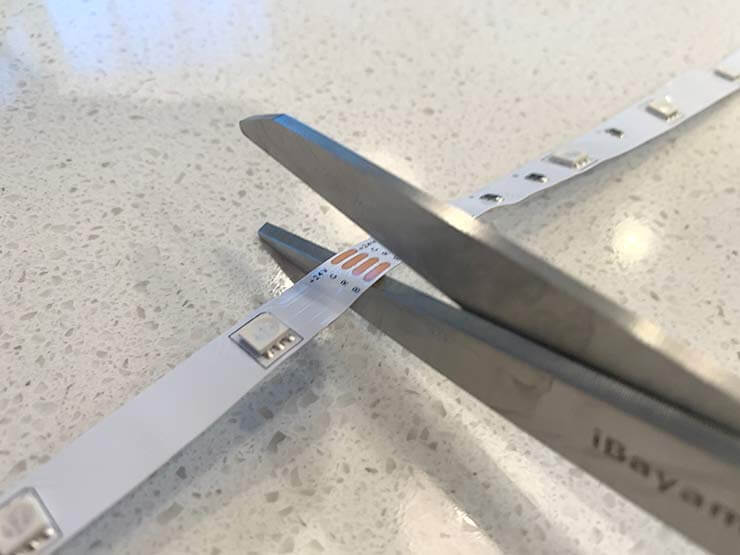
Can You Cut LED Lights?
Yes, you can cut most LED strip lights to fit your space. The trick is to cut only in the right places, and where you should cut LED strips is marked on the strip itself.
Every cuttable LED strip has marked cut points. Look for a cut line, often with a small scissors icon, running through a pair of copper pads. Cut straight through the middle of that line, and both pieces keep their electrical contacts.
How often the cut points come up depends on the strip:
- 12V strips can usually be cut every 3 LEDs, often every 5 cm (about 2 inches).
- 24V strips usually have cut points every 6 LEDs, often every 10 cm (about 4 inches).
- COB strips (the ones with a continuous line of light and no visible dots) and some addressable strips can often be cut at much shorter intervals.
If you cut anywhere else, the section you cut through will stop working, and the pads you need for reconnecting won't be there.
Not every LED light can be cut. Don't cut a strip anywhere marked as uncuttable, through the controller box, or through the plug or USB end. Some smart strips can be cut but can't be extended or reconnected afterward, so check the manual first. Rigid LED bars, rope lights, and LED bulbs are a different story. Most of these can't be cut at all, or can only be cut at specific marked intervals.
Why Would You Cut LED Lights?
The main reason is a clean, made-to-fit installation. Cutting lets you:
- Fit the strip to the space, whether that's under kitchen cabinets, behind a TV, along a shelf, or around a mirror, without leftover length to hide.
- Go around corners neatly. Cutting the strip and joining the pieces with a corner connector gives you a crisp 90-degree turn, without folding the strip and stressing it.
- Build more complex layouts, such as several runs of different lengths or shapes like frames and outlines.
- Reuse leftovers. An offcut can be used on a smaller project if you give it its own power connection.
Does an LED Strip Still Work After You Cut It?
Yes, as long as you cut at a marked cut point.
The section still attached to the power supply or controller will keep working normally. The piece you cut off won't light up on its own, because it's no longer connected to power. It will work fine as soon as you connect it, either to the end of the original strip using a connector or a short wire, or to its own power supply.
If you cut between the marked points, the LEDs in the damaged section will usually go dark. You can't repair that section, though the rest of the strip should still work.
What Tools Do You Need to Cut LED Lights?
You don't need much:
- Sharp scissors for a clean cut. A craft knife works too, especially on thicker strips.
- A tape measure to work out the length you need.
- A marker to mark your cut point.
- Connectors or a soldering iron to join pieces or add power leads (more on these below).
- For waterproof strips: a craft knife to trim back the silicone coating, plus end caps and silicone sealant to reseal the cut ends.
If you're mounting the strip in an aluminum channel, a small strip roller or your thumb helps press the adhesive backing down evenly for a neat, secure finish.
Step-by-Step: How to Cut LED Strip Lights
- Unplug the strip. Always disconnect the power before you cut or handle the wiring.
- Measure the run. Measure the space where the strip will go and note the length you need. If you're going around corners, measure each straight section separately.
- Find the nearest cut point. Unroll the strip and find the cut line closest to your measurement. If it falls between two cut points, use the shorter one so the strip fits, or the longer one if a slight overhang won't matter.
- Cut straight through the middle of the cut line. Cut slowly and squarely so that each piece keeps half of each copper pad.
- Reseal waterproof strips. If your strip has a silicone coating, add end caps and a little silicone to keep moisture out of the cut end.
- Reconnect, then test. Attach a connector or power lead if needed, plug the strip back in, and make sure every section lights up before you stick it down.
How Do You Connect LED Lights After Cutting Them?
Yes, you can reconnect the pieces after a cut. The same approach is how you connect multiple LED strip lights. There are two main ways to do it.
1. Solderless connectors. These are the easiest choice for most people. Clip-on connectors grip the copper pads at the end of the strip, and you can get them in several styles:
- Strip-to-strip connectors join two pieces end to end.
- Corner (L-shaped) connectors join two pieces at a right angle.
- Strip-to-wire connectors let you leave a gap between sections or connect a cut piece to a power supply.
Make sure the connector matches both the width of your strip (8 mm and 10 mm are the most common) and the number of pins. That's usually 2 pins for single-color strips, 3 for tunable white or many addressable strips, 4 for RGB, and 5 or 6 for RGBW and RGBCCT. Waterproof strips need waterproof-rated connectors.
2. Soldering. Soldering wires to the copper pads takes a little more skill, but it gives you the most reliable, longest-lasting connection. It's the better choice for permanent installations, for strips that will be moved or flexed, and for places where a clip-on connector won't fit.
Either way, pay attention to polarity and direction. Match + to +, and match each color channel (R, G, B, W) to the same label on the other piece. On addressable or "smart" strips, the data signal only flows one way, so make sure the arrows printed on the strip point away from the controller on every piece.
How to Use an LED Strip Connector
Using a solderless LED strip connector takes about a minute:
- Open the connector. Lift the hinged cover or pull out the clip.
- Prepare the strip end. On some strips you'll need to peel back a little of the adhesive backing. On waterproof strips, trim the silicone off the copper pads with a craft knife.
- Slide the strip in. Push the end of the strip into the connector so that the copper pads sit right under the metal contacts, with the + mark matching the connector's + side.
- Close it firmly. Snap the cover shut until it clicks. The contacts need to press firmly on the pads to make a good connection.
- Test it. Turn the power on and check that every LED lights up and that the colors are right. If one color is missing or the colors are mixed up, the strip is probably misaligned or flipped. Open the connector, adjust it, and try again.
Pros and Cons of Cutting LED Lights
Pros:
- You get a custom fit for any space, with no extra strip to coil up or hide.
- You can create corners, frames, and other custom layouts.
- You can save leftover pieces and use them on other projects.
Cons:
- Cutting in the wrong place ruins that section of the strip.
- Connectors are an extra cost and can come loose if the strip moves around a lot.
- Long runs or many joins can cause voltage drop, which makes the far end look dimmer. For long installations, run power to both ends or to the middle.
- Cutting can void the warranty on some products, especially smart lighting kits, so check before you cut.
What to Do If Your LED Strip Doesn't Light Up After Cutting
If a section stays dark after cutting, work through these checks:
- Check where you cut. Was the cut right in the middle of the marked line? If you cut off-center, a pad may be too small to make good contact.
- Reseat the connector. Most problems come from a connector that isn't fully closed or a strip that has slipped out of position. Open it, line the pads up with the contacts, and close it firmly.
- Check polarity and direction. Make sure + goes to +, each color channel lines up, and the data arrows on addressable strips point the right way.
- Look for damage. Check for cracked pads, lifted copper, or a pinched strip. If a section is damaged, cut it off at the next cut point and reconnect.
- Check the power supply. If you've extended the strip with offcuts, the total length may now be more than your power supply can handle, or more than the strip can carry from one end. Look up the wattage per meter on the spec sheet and compare it with the supply's rating.
If none of these fixes it, contact the manufacturer. Many will tell you which replacement sections or connectors fit your strip.